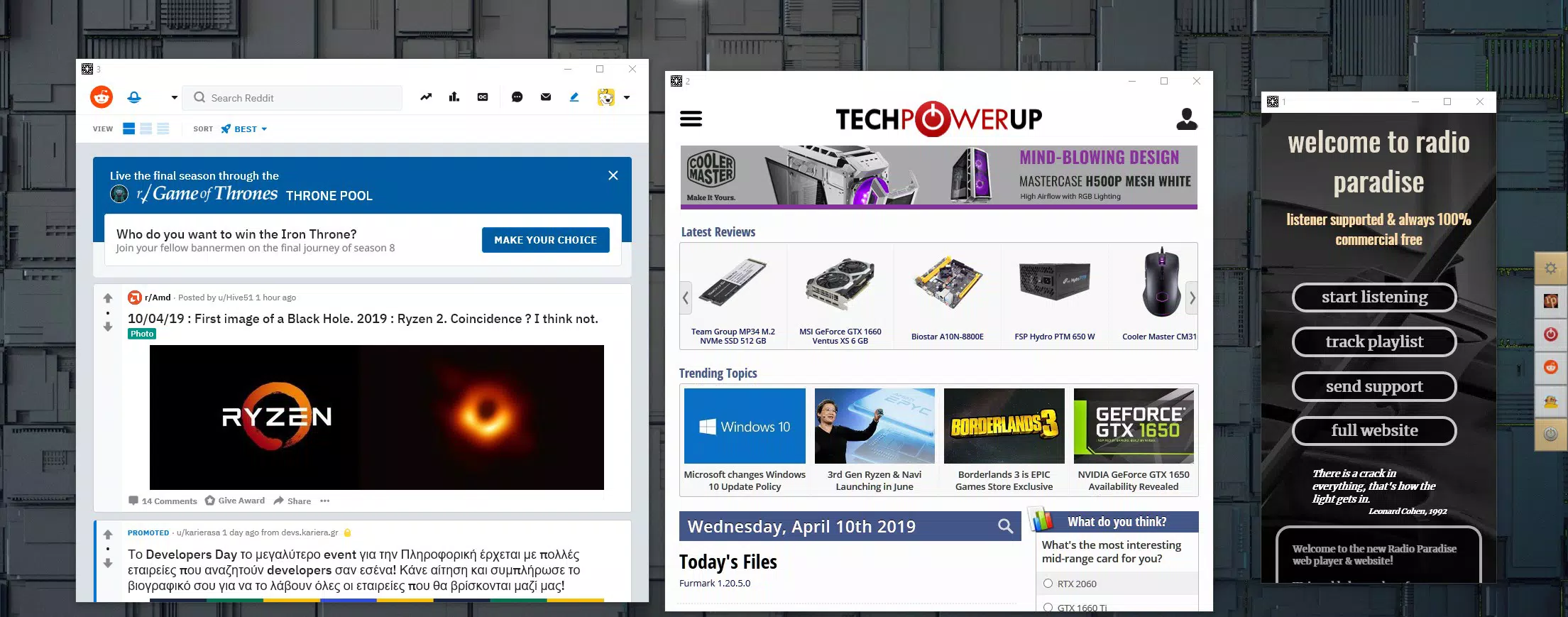

Download Desktop Web Tiles – Fast, Privacy-Focused Web Access Tool
Overview
Desktop Web Tiles is a specialized mobile application designed for users seeking a streamlined, distraction-free method to access their most frequently used websites. Unlike traditional browsers, this tool offers a dedicated workspace where favorite online services—such as banking portals, radio stations, and productivity platforms—can be accessed instantly through customizable tiles. Its core purpose is to eliminate browser clutter and reduce the cognitive load associated with managing multiple tabs and sessions. The app targets professionals, remote workers, and digital enthusiasts who prioritize efficiency and focus in their daily workflows.
By leveraging the Edge™ engine, Desktop Web Tiles delivers fast performance and reliable connectivity, ensuring minimal lag when switching between services. This makes it particularly useful for users who rely on consistent access to specific web applications without the overhead of full browser environments. The app supports a clean separation of online activities, which enhances privacy by preventing tracking and cookie accumulation. While the developer did not provide additional background details, the app’s design suggests a focus on utility and user control.
Real-world use cases include managing multiple financial accounts, monitoring live radio streams, or maintaining persistent access to project management tools. In the broader app ecosystem, Desktop Web Tiles fills a niche for lightweight, task-specific web access solutions, offering an alternative to heavy browsers and complex web app suites.
Key Features & Functionality
- Fast and Efficient Performance: Powered by the Edge™ engine, the app ensures rapid loading and smooth interaction with web services. This is especially beneficial when accessing multiple sites simultaneously without performance degradation.
- Privacy Focused: The app does not track browsing history or store cookies, reducing the risk of data retention. This feature is ideal for users concerned about online privacy and digital footprint.
- Customizable Interface: Users can position website tiles on either the left or right side of the screen, allowing for personalized workspace layouts that suit different workflows and screen sizes.
- Persistent Website Windows: Each website remains open exactly as it was last used—preserving size, position, and state. This enables continuity across sessions, minimizing setup time and enhancing productivity.
- No Navigation Distractions: The absence of standard browser navigation elements like 'Back' and 'Forward' buttons reduces interruptions, helping users stay focused on their intended tasks.
For example, a remote worker might use Desktop Web Tiles to keep their bank dashboard, email client, and project tracker open simultaneously. Upon returning to the app, all sites appear exactly as they were, eliminating the need to reconfigure or re-navigate. Similarly, a music enthusiast could maintain a live radio station and a playlist manager open without the risk of accidental tab switches or unwanted redirects.
Interface, UX & Performance
The user interface of Desktop Web Tiles is minimalist and task-oriented, emphasizing clarity and direct access. The layout centers around a grid of customizable tiles, each representing a specific website. These tiles are arranged in a panel that can be toggled to appear on the left or right side of the screen, allowing users to tailor the workspace to their preferred workflow.
Navigating between tiles is intuitive, with touch-based activation providing instant access to the associated web service. The absence of traditional browser controls contributes to a focused experience, reducing the temptation to explore unrelated content. The app maintains a consistent visual style, with clean lines and neutral color schemes that minimize visual noise.
Although the developer did not list formal performance metrics, the use of the Edge™ engine suggests optimized rendering and efficient memory management. The app is expected to perform reliably across various device categories, from mid-range smartphones to high-end models. Responsiveness appears to be a priority, with smooth transitions between active sites and minimal lag during interactions. Stability is implied through the persistent window feature, which indicates a robust session management system. However, specific compatibility details were not disclosed.
Platform Compatibility & Technical Requirements
Desktop Web Tiles is available for Android and iOS platforms, though the exact operating system versions and device requirements were not specified by the developer. The app’s file size is reported as 45.2 MB, indicating a lightweight footprint suitable for devices with moderate storage capacity.
Users should ensure their device meets the minimum OS requirements, though the developer did not provide detailed information on this. It is recommended to check the official app store listing for updated compatibility details. The app supports both smartphones and tablets, enabling flexible use across different screen sizes and form factors.
Given the app’s focus on performance and privacy, it is likely optimized for modern mobile hardware. However, without explicit technical specifications, users are advised to consult the platform’s official store for the most accurate installation and operational guidance.
Pros and Cons
- Fast performance powered by the Edge™ engine
- Enhanced privacy with no tracking or cookie storage
- Customizable tile layout for personalized workflows
- Persistent website windows across sessions
- Minimalist interface reduces distractions and boosts focus
- Developer did not provide detailed technical specifications
- Compatibility with specific OS versions was not disclosed
- No built-in update notifications or automatic sync features
- Limited visibility into app performance on older devices
- Privacy features require user diligence (e.g., manual logout from sensitive accounts)
FAQ
Is Desktop Web Tiles safe to use?
The app emphasizes privacy by not tracking browsing history or storing cookies. However, users should manually log out of sensitive accounts to maintain security, especially on shared devices.
Can I use Desktop Web Tiles on both Android and iOS?
Yes, the app is available on both Android and iOS platforms. Specific OS version requirements were not listed by the developer.
Does the app support automatic updates?
The developer did not specify whether automatic updates are enabled. Users should check their device’s app store settings for update availability.
How does Desktop Web Tiles differ from a regular browser?
Unlike traditional browsers, Desktop Web Tiles removes navigation buttons and browser clutter, offering a focused environment for accessing only selected websites. It also preserves the state of open sites across sessions.
Is the app free to download and use?
While the app’s pricing was not specified, it is available for download on major app stores. Users should verify the current price and any in-app purchase options directly from the store listing.
Final Thoughts
Desktop Web Tiles stands out as a focused, privacy-conscious tool for users who value efficiency and minimalism in their digital workflows. Its ability to maintain persistent, distraction-free access to essential web services makes it a valuable utility for professionals, remote workers, and tech-savvy individuals. The customizable interface and optimized performance further enhance its appeal as a lightweight alternative to full-featured browsers.
While some technical details remain undisclosed, the app’s core functionality is clear and well-executed. For those seeking a secure, streamlined way to manage online tasks without the noise of traditional browsing, Desktop Web Tiles offers a compelling solution. Its emphasis on privacy, performance, and user control aligns with modern digital needs.
Download Desktop Web Tiles now


